
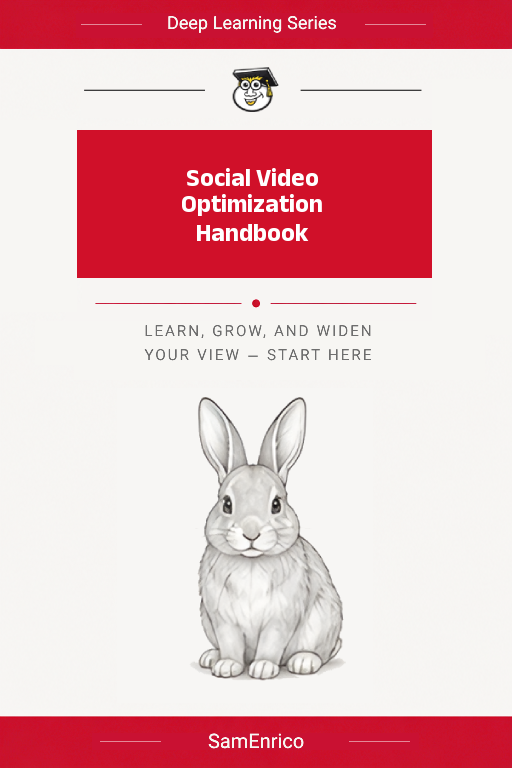
Non-FictionAI OperatorMedia OperationsSocial Guide
Social Video Optimization Handbook eBook
Auto-format videos for TikTok, YouTube Shorts, Ins
Auto-format videos for TikTok, YouTube Shorts, Instagram Reels, and LinkedIn with AI cropping and reframing. Includes attention-grabbing hooks, subtitling, and retention analysis.
Formats
Free sample
Chapter 1: The Square Lie–- Most creators destroy their videos before they ever press record. They frame for a rectangle. They edit for a television. And then they wonder why their vertical videos feel cramped, awkward, and ignored. The problem isn't their content.
It's their container. This chapter dismantles everything you thought you knew about video mastering and rebuilds it around a single, counterintuitive truth: the square is your secret weapon.The Aspect Ratio Graveyard Walk through any creator's hard drive and you will find the same graveyard. Horizontal videos shot at 16:9, beautifully composed, color graded, and entirely useless for the platforms where audiences actually live. The creator then spends hours—sometimes days—manually reframing each clip, guessing where to crop, losing half the frame, and watching their careful composition vanish into a vertical slot machine of visual chaos.This handbook exists because that workflow is broken. And it is broken not because the tools are inadequate, but because the fundamental assumption is wrong.Most books on video marketing assume you shoot horizontal and crop vertical.
They treat vertical video as an afterthought, a necessary evil, a format you tolerate because Tik Tok forces you to. That assumption leaks into every decision: how you frame interviews, where you place text, how you transition between shots. The result is vertical video that feels like amputated horizontal video—missing context, awkward pacing, and a subtle but persistent wrongness that audiences feel even if they cannot name it.The solution is not better cropping software. The solution is to stop cropping.This chapter introduces the concept of vertical-first editing (see Glossary), a philosophy that begins with the final delivery format and works backward. But before we can work backward, we need to understand exactly what we are aiming for.
And that means confronting the single most misunderstood variable in social video: aspect ratio.The Four-Platform Breakdown You cannot optimize for a platform you do not understand. Most creators treat Tik Tok, You Tube Shorts, Instagram Reels, and Linked In as interchangeable vertical slots. They are not. Each platform has different native aspect ratios, different UI elements that occlude your content, different user intentions, and different algorithmic rewards. Treating them the same is like serving steak to a vegan, wine to a recovering alcoholic, and cake to a diabetic—and being surprised when no one eats.Let us break down each platform individually, because the differences here will determine every decision in the chapters that follow.Tik Tok: The Full Vertical Playground Tik Tok's native aspect ratio is 9:16, full vertical.
This means the frame is 1080 pixels wide by 1920 pixels tall. The user holds their phone vertically, and the video fills the entire screen. There is no letterboxing, no black bars, no distraction.The UI on Tik Tok includes the following elements that occlude your content: the creator's handle and caption at the bottom (occupying approximately 15% of the frame height), the like/comment/share buttons on the right side (occupying roughly 10% of the frame width), and the profile icon and song title at the bottom left. When we talk about UI occlusion (see Glossary), Tik Tok is moderately aggressive but predictable.User intent on Tik Tok is primarily entertainment and discovery. People open Tik Tok to be surprised, delighted, or educated in under 60 seconds.
They are scrolling quickly, and their swipe reflex is hair-trigger. Tik Tok's algorithm rewards completion rate above all else—more on that in Chapter 10—which means keeping every single second engaging is not optional. It is survival.You Tube Shorts: The Search-Driven Hybrid You Tube Shorts also uses 9:16 vertical, but the user experience is fundamentally different. Shorts live inside the You Tube ecosystem, which means they compete for attention not only with other Shorts but also with long-form videos, search results, and recommended content. The Shorts shelf—the scrolling feed where Shorts appear—presents videos in a vertical loop, but the user can swipe up to see another Short or swipe left to exit entirely.The UI on Shorts is heavier than Tik Tok.
You Tube overlays the video title, channel name, subscriber count, like/dislike buttons, comment field, and a "Remix" option. The bottom 20% of the frame is often covered, and the top 10% contains the channel avatar and subscribe button. This means your safe zone (see Glossary) for Shorts is narrower than for Tik Tok.User intent on Shorts is search-driven micro-learning. People come to You Tube with questions: "How to fix a leaky faucet," "Why is my plant dying," "What is the capital of Bhutan." Shorts that answer specific queries outperform purely entertaining content. The algorithm rewards re-watches and click-through to long-form videos, not just completion rate.Instagram Reels: The Social Graph Battlefield Instagram Reels uses 9:16 vertical but lives inside the social graph.
Unlike Tik Tok, where the For You Page dominates, Reels appear in the main feed (mixed with photos from accounts you follow), the Explore tab, and the dedicated Reels tab. This means your Reel competes with your aunt's vacation photos and your friend's lunch post.The UI on Reels includes the creator's handle, caption, and audio information at the bottom (about 12% of frame height), like/comment/share buttons on the right (8% of width), and the profile icon at the top left. Instagram also overlays a "Sponsored" label on paid content and a "Follow" button that can cover faces if you are not careful.User intent on Reels is social graph plus Explore discovery. People use Reels to stay connected to people they already follow while also discovering new accounts. Shareability is the most important metric here—Instagram rewards Reels that get sent via DM.
A Reel that is entertaining but not shareable will underperform a less-polished Reel that triggers the "send this to someone who…" impulse. More on engagement triggers in Chapter 7.Linked In: The Professional Exception Linked In is where most creators go wrong. They assume Linked In wants 9:16 vertical like every other platform. This is incorrect. Linked In's native feed does not support full 9:16 vertical without cropping.
Videos uploaded at 9:16 are letterboxed or, worse, cropped aggressively. The correct aspect ratios for Linked In are 1:1 square or 4:5 portrait.The 1:1 square (1080x1080) is the safest option. It displays perfectly in the feed, on mobile, and on desktop. The 4:5 portrait (1080x1350) gives you slightly more vertical real estate while still displaying without cropping. Never upload 9:16 to Linked In.The UI on Linked In is cleaner than other platforms.
The feed shows the creator's name, headline, and a "like/comment/share" bar at the bottom. There is no music title, no complex overlay, no sponsored labels fighting for space. However, Linked In users are on desktop approximately 40% of the time, which means your video must look good on a horizontal monitor as well as a vertical phone.User intent on Linked In is professional utility and trust-building. People come to Linked In to learn skills, vet potential hires, and establish expertise. They will tolerate slower pacing and longer videos—up to 60 seconds—but they expect value per second.
Fluff is punished ruthlessly.The Aspect Ratio Summary Table For quick reference, here is everything you need to know about platform aspect ratios and UI occlusion:Platform Native Aspect Ratio Linked In…
This is the end of the free sample. Get the eBook to keep going. Buy now
About this book
Details
- Author
- Dukes Maxwell
- Publisher
- SamEnrico
- Language
- English
- Genre
- Non-Fiction, AI Operator, Media Operations, Social Guide
- Released
- 2026-06-01
- Pages (approx.)
- 129
- Available as
- eBook, Audiobook

Read better in the ZLOADR app
Your eBooks on your phone or tablet. Sign in with your SamEnrico account and start reading.
More by Dukes Maxwell
 Jesus of Nazareth AccountDukes Maxwell$11.99
 The Body Image Healing WorkbookDukes Maxwell$11.99
 Burnout Prevention for Tech Workers WorkbookDukes Maxwell$11.99
 MBSR For Grief And Loss WorkbookDukes Maxwell$11.99
 Workplace Stress for Healthcare WorkersDukes Maxwell$11.99
 The Siege of Leningrad: 900 Days of DefianceDukes Maxwell$11.99
 How to Start a Olive Growing Business (Beginners Guide)Dukes Maxwell$11.99
 Understanding Kleiner–holmes SyndromeDukes Maxwell$17.99
 Accounts Payable SpecialistDukes Maxwell$11.99
 SaaS Funding Environment OutlookDukes Maxwell$12.99
You may also like
 Hong Kong Handover 1997Dunn Johnnie$11.99
 Zumba For Postnatal Recovery CourseNeal Christian$11.99
 Zumba for BeginnersLadner Nikia$11.99
 YouTube Comment Mining GuideHumes Pandora$12.99
 Worry Box MeditationCarlin Rudy$11.99
 Workplace Stress MeditationNguyen Lynn$11.99
 Workplace Stress and Sleep RepairHawley Ivory$11.99
 Workplace Perfectionism CureDelaney Jeffry$11.99
 Workplace Injustice Anger GuideWallen Isabelle$11.99
 Work Addiction and Burnout LinkGreenwood Ester$11.99
 Women in Yoga and WellnessBeattie Galina$11.99
 Women in Stand Up ComedyChun Evangeline$11.99